System Design 1 - Basic request flow

Understanding Request Flow in System Design
we'll dive into how a request flows through a system from the frontend to the backend (assume net banking).
Here’s an illustration to help us visualize the process.
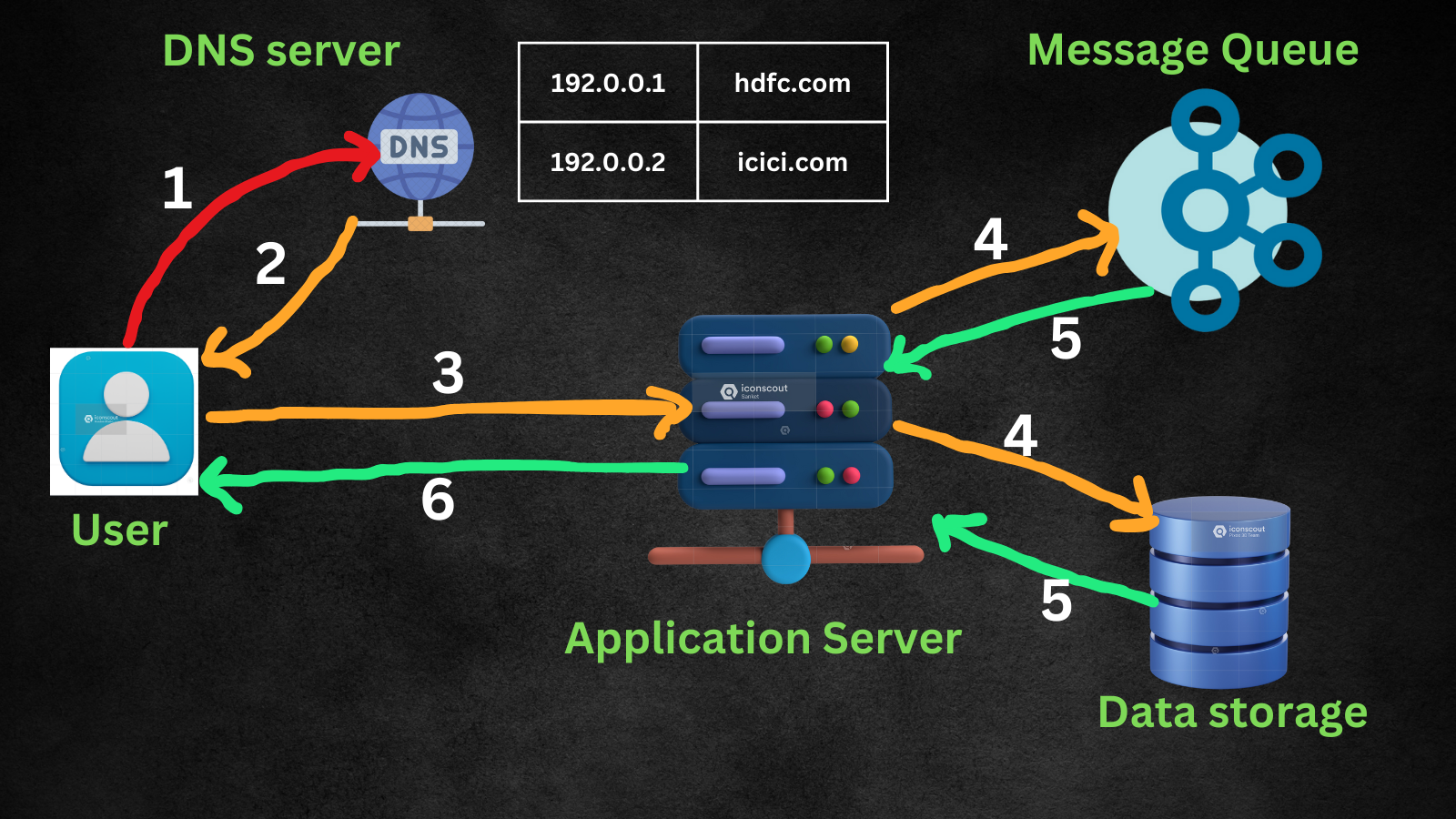
👤 Step 1: User Interaction
- A user initiates a request by interacting with the frontend application (e.g., clicking a button, submitting a form).
🌐 Step 2: DNS Lookup
The request is sent to the DNS server to resolve the domain name (e.g., www.netbanking.hdfc.com) into an IP address, directing the request to the correct server.
Detailed Explanation:
What is DNS?: DNS stands for Domain Name System. It translates human-readable domain names into IP addresses that computers use to identify each other on the network.
How it works:
When a user enters a URL into their browser, the browser sends a DNS query to a DNS server.
The DNS server looks up the domain name in its database. If it doesn’t have the record, it queries other DNS servers in a hierarchical manner until it finds the IP address.
Once the IP address is found, it is sent back to the user's browser.
The browser can now send the HTTP request directly to the IP address of the server hosting the website.
Example:
User types "www.netbaking.hdfc.com" in their browser.
Browser sends a DNS query to the DNS resolver.
The DNS resolver checks its cache. If not found, it queries other DNS servers.
Eventually, the IP address (e.g., 192.0.2.1) is found and returned to the browser.
The browser uses this IP address to send a request to the correct server.
This process ensures that users can access websites using easy-to-remember domain names instead of numeric IP addresses.
🖥️ Step 3: Application Server
- The resolved request reaches the application server, which handles the business logic and processes the request.
🔀 Step 4: Message Queue & Data Storage
The application server sends the request to a message queue for asynchronous processing.
It also interacts with the data storage to retrieve or store data as needed.
🗄️ Step 5: Processing & Storage
The data storage layer retrieves necessary information and updates records if required.
The message queue ensures tasks are handled efficiently without blocking the main process.
↩️ Step 6: Response to User
- Finally, the application server sends a processed response back to the user, completing the request cycle.
📈 Understanding this flow is crucial for designing scalable and efficient systems. Each component plays a vital role in ensuring smooth operation and quick response times.